If you have multiple documents to upload, there’s a more efficient way than the one-at-a-time method above.
HOWEVER: To use this method, you need additional credentials to access the site’s full dashboard. Use this link to request credentials.
Important Requirement for Batch Uploads
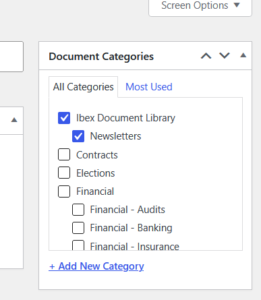
When adding uploads in batches, you must select both the desired category AND the Ibex Document Library for the document to display in the folder. The image below shows the right column of the dashboard after both are properly checked.
Video Tutorial
The video below demonstrates the process outlined above. It is set to start at the 10:00 mark which demonstrates the process outlined above. And it stops at 11:30.
Use this link to view the entire tutorial on YouTube. It has everything you’d want to know about Adding and importing documents in the Document Library Pro System.